

The Shopify Developer Performance Toolkit
For Shopify developers and technical agencies, building a fast, highly functional storefront is the core of the job. You spend hours optimizing Liquid code, implementing headless architectures, and refining the critical rendering path. However, a developer’s job doesn’t end when the site goes live. In the chaotic environment of production ecommerce, where clients constantly install new apps and upload unoptimized assets, performance can degrade rapidly.
When a storefront slows down, the developer is usually the first person the client calls. Without the right monitoring tools, developers are forced to play detective—spending unbillable hours hunting down performance regressions caused by third-party scripts or client errors. Shopify developers need a robust performance toolkit that provides production-level visibility, accurate debugging data, and the ability to prove the value of their technical work to non-technical stakeholders.
The Problems Shopify Developers Face
Developing for the Shopify ecosystem presents unique challenges, particularly regarding ongoing performance maintenance and client communication.
The Blame Game with Third-Party Apps
Shopify’s greatest strength is its app ecosystem, but it is also a developer’s biggest headache. A client might install three different marketing apps, instantly injecting heavy, render-blocking JavaScript into the storefront. When the site inevitably slows down or the Core Web Vitals plummet, the client often blames the developer’s theme code. Without concrete data to isolate the impact of specific scripts, developers struggle to defend their work and convince clients to audit their tech stack.
Difficult Performance Debugging in Production
Local development environments are fast and clean. Production environments are messy. A performance issue that only occurs for Safari users on mobile devices with slow connections is incredibly difficult to reproduce and debug using standard browser dev tools or synthetic Lighthouse tests. Developers need real-world session data to understand exactly when and where these edge-case failures are happening.
Proving Technical Value to Business Owners
Clients care about revenue, not render-blocking resources. When a developer spends a week refactoring JavaScript to improve Interaction to Next Paint (INP), the client might not visually notice the difference. Bridging the gap between deeply technical optimizations and tangible business value is a constant struggle for developers trying to justify their rates and secure ongoing retainers.
How Superspeed Helps Shopify Developers
Superspeed serves as the ultimate diagnostic and monitoring layer for Shopify developers, providing the real-world data necessary to maintain high-performance storefronts and prove ROI.
Monitor Production Stores Continuously
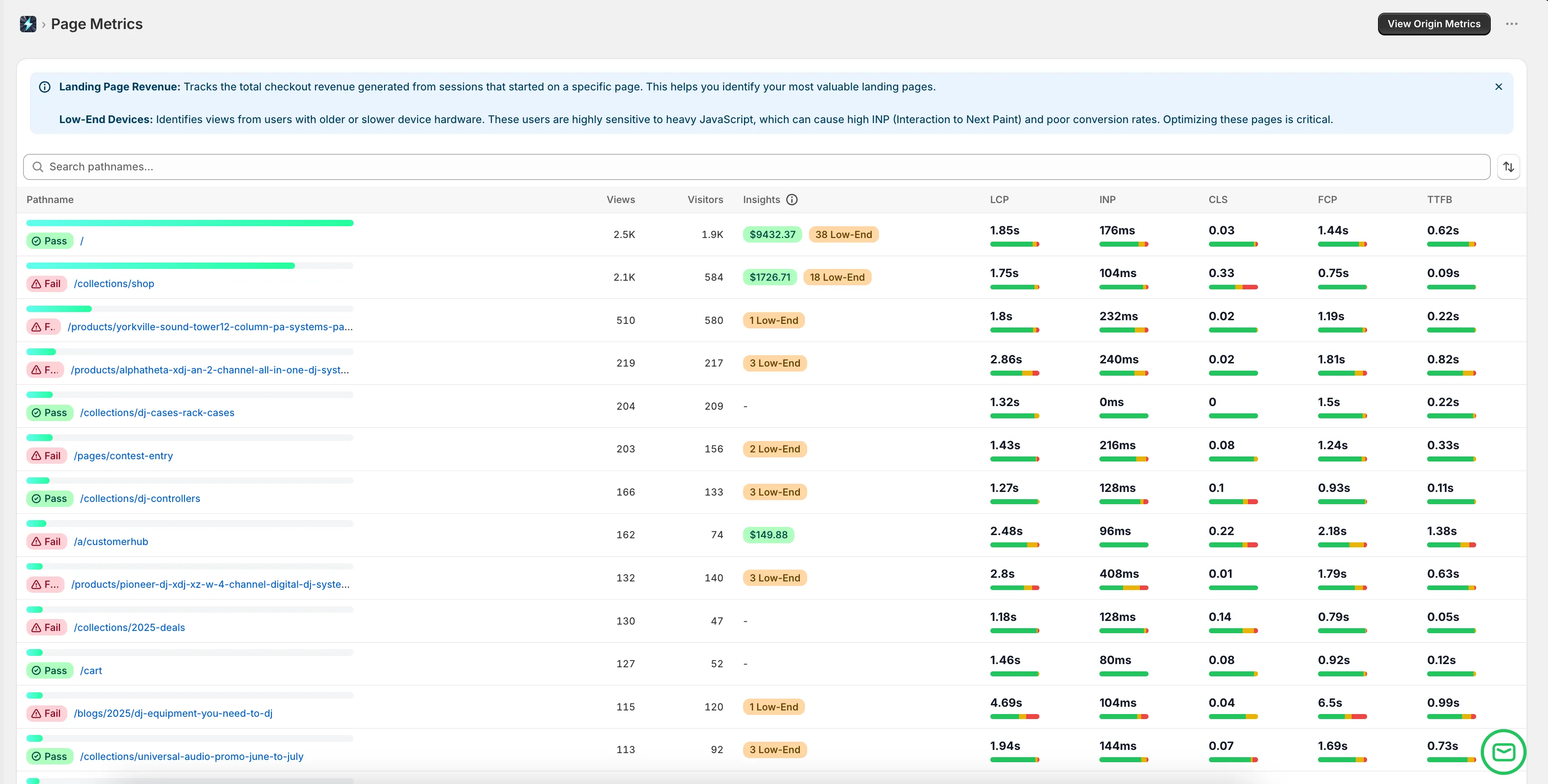
Superspeed uses Real User Monitoring (RUM) to constantly track the performance of the live storefront. Developers gain access to a dashboard that reflects the actual experiences of real shoppers, capturing metrics like Largest Contentful Paint (LCP) and Cumulative Layout Shift (CLS) across all device types and network conditions.
Detect Regressions Immediately
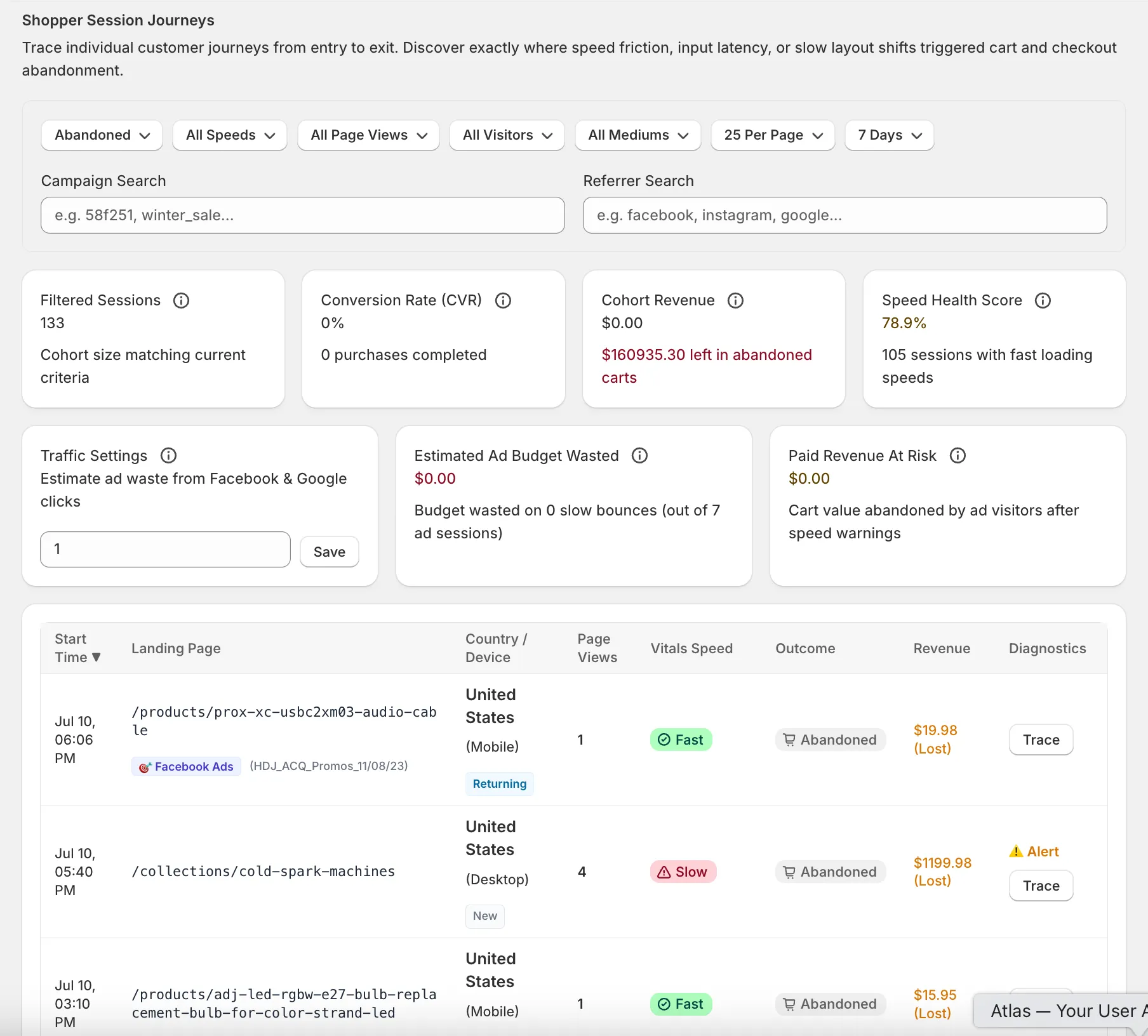
Instead of waiting for a client to complain that the site feels slow, Superspeed alerts developers to performance regressions as they happen. If a client installs a poorly coded chat widget that destroys the INP score, the developer can see the impact immediately in the dashboard and address the issue proactively.
Identify Problematic Pages and Scripts
Superspeed’s granular data allows developers to drill down into specific pages and identify the exact bottlenecks causing friction. Whether it’s a massive, unoptimized hero image on the homepage or a heavy script executing during checkout, developers have the data needed to pinpoint the root cause without hours of manual auditing.
Measure the Business Impact of Technical Work
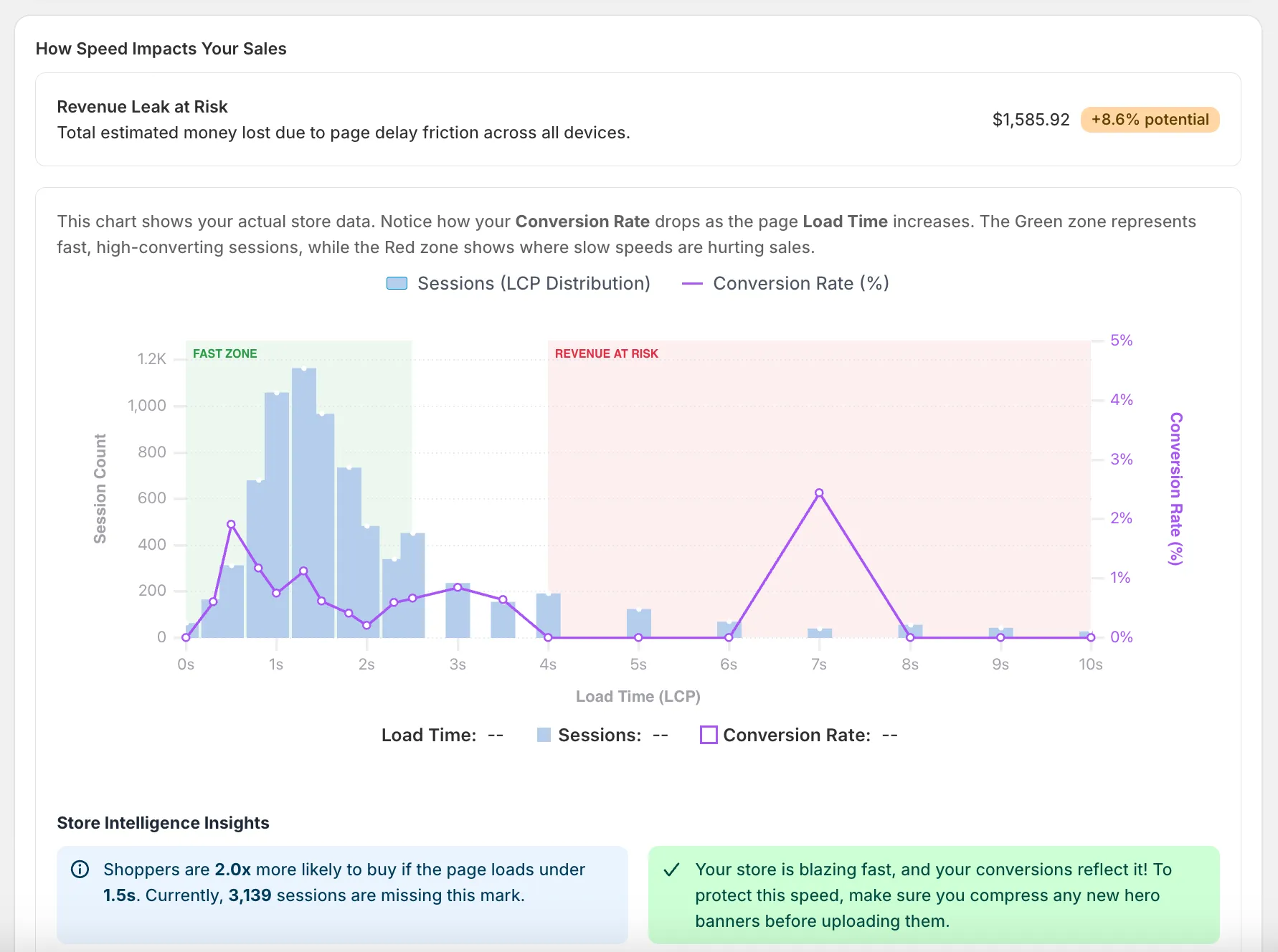
Superspeed bridges the gap between code and revenue. By correlating performance metrics with shopper behavior, developers can show clients exactly how their technical optimizations impact the bottom line. Instead of saying, “We improved INP by 200 milliseconds,” a developer can say, “We removed the script causing checkout lag, which recovered an estimated $5,000 in monthly revenue.”
Practical Examples for Shopify Developers
Superspeed is invaluable across a wide range of common Shopify development projects.
Theme Migrations and Headless Builds
When moving a client to a new Online Store 2.0 theme or a complex headless architecture, developers use Superspeed to establish a performance baseline on the old site. After the launch, they use Superspeed’s RUM data to prove definitively that the new architecture is faster, more stable, and providing a better user experience than the legacy system.
Building Custom Sections
When developing highly interactive, custom Liquid sections or React components, developers need to ensure they aren’t introducing layout shifts or main-thread blocking JavaScript. Superspeed allows them to monitor these specific components in production to verify their real-world efficiency.
App Integrations and Audits
When integrating complex third-party tools, developers use Superspeed to isolate the performance cost of the integration. If a new search provider significantly degrades LCP, the developer has the hard data needed to push back on the vendor or recommend a more performant alternative to the client.
JavaScript Optimization and Refactoring
Refactoring legacy JavaScript to improve responsiveness (INP) is high-value work that is often invisible to the naked eye. Superspeed tracks the reduction in rage clicks and slow interactions, allowing developers to present a clear “before and after” picture of their refactoring efforts.
Conclusion: The Essential Monitoring Layer
For professional Shopify developers, writing clean code is only the beginning. Maintaining that code in the wild and communicating its value are equally critical skills.
Superspeed becomes the essential monitoring layer after development is complete. It provides the undeniable, real-user data developers need to debug complex production issues, hold third-party apps accountable, and translate technical excellence into measurable business success. By integrating Superspeed into their workflow, developers protect their work, justify their value, and build stronger, long-term partnerships with their clients.