

Performance Analytics for Shopify Consultants
As a Shopify consultant, your primary role is to provide expert guidance that helps merchants navigate the complexities of ecommerce and accelerate their growth. Clients look to you to solve problems they can’t solve themselves, whether it’s diagnosing a drop in conversion rates, recommending the right tech stack, or optimizing their operational workflows.
However, providing strategic advice is difficult when you lack visibility into the technical reality of the storefront. If a client asks why their mobile conversion rate is lagging, relying solely on Google Analytics or generic best practices is insufficient. You need to know exactly what is happening to actual shoppers on the site. Without concrete performance data, consulting recommendations remain theoretical. To deliver high-value, actionable insights, Shopify consultants need a platform that exposes the hidden technical friction costing their clients money.
The Challenge of Subjective Consulting
Merchants are often bombarded with advice from various sources—app vendors, theme developers, and marketing agencies. As a consultant, your recommendations must cut through the noise and be backed by undeniable proof.
The Limits of Standard Audits
When onboarding a new client, many consultants perform a standard store audit. This often involves checking theme settings, reviewing installed apps, and running a quick Lighthouse test. While helpful, these static audits only provide a snapshot in time. They don’t reveal how the site behaves dynamically under real-world traffic conditions, making it hard to prioritize which technical issues actually matter.
Theoretical Recommendations vs. Proven Friction
Telling a client, “You have too many apps installed, which might slow down your site,” is a theoretical recommendation. The client may hesitate to uninstall apps they believe are driving sales. However, telling a client, “This specific reviews app is blocking the main thread for 2 seconds on mobile devices, causing a 15% abandonment rate on product pages,” shifts the conversation from theory to an urgent, proven business problem.
Measuring the Impact of Your Advice
If you recommend a major architectural change, such as migrating to a faster theme or consolidating the tech stack, you need a way to prove that the investment paid off. Without a baseline of Real User Monitoring (RUM) data and post-implementation tracking, you cannot definitively show the client the ROI of your strategic guidance.
Elevating Consulting with Superspeed
Superspeed empowers Shopify consultants to move from subjective observation to data-driven revenue intelligence. It provides the diagnostic tools necessary to uncover deep technical flaws and present them in a language the merchant understands: revenue.
Deep Diagnostic Auditing
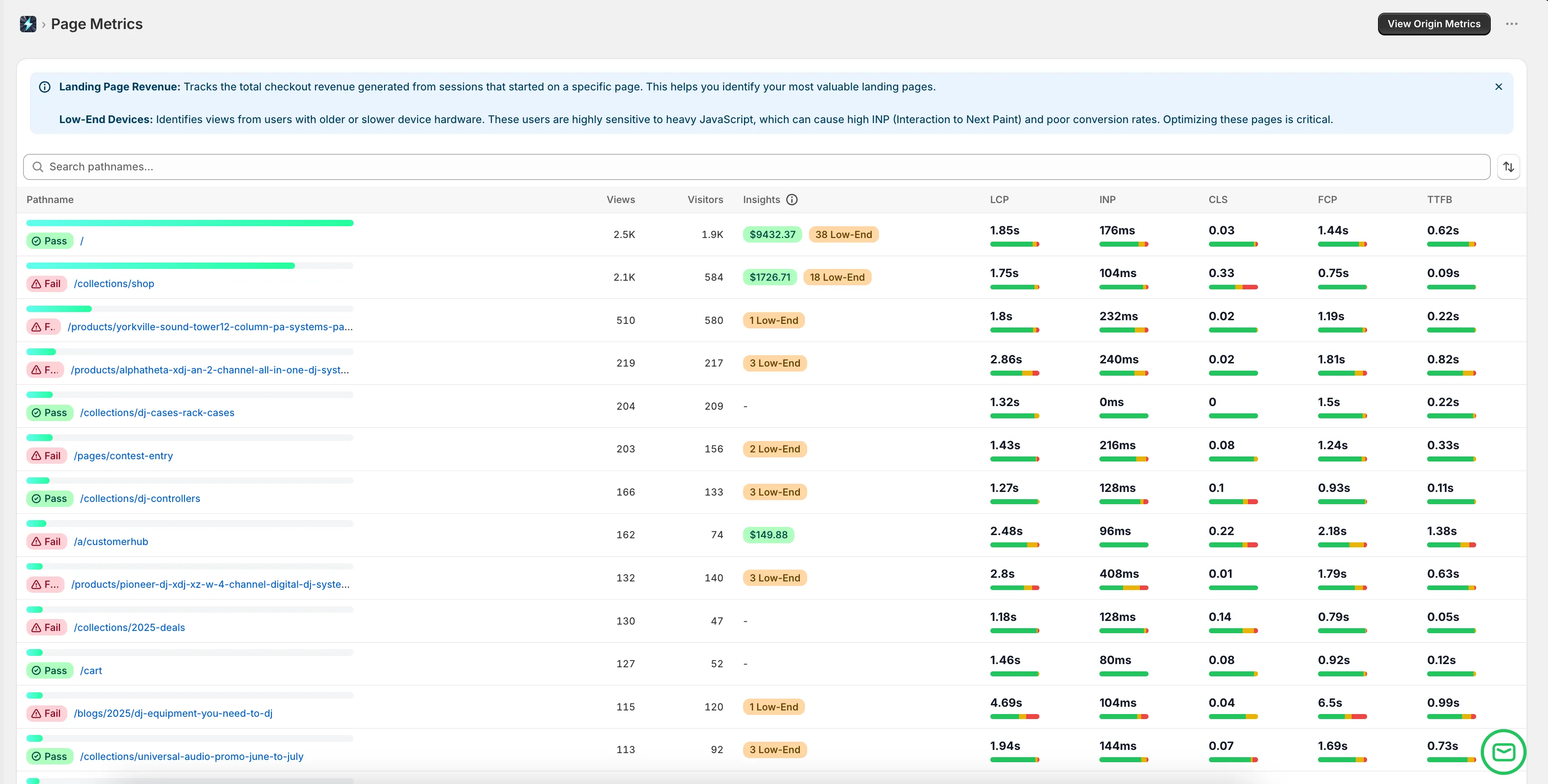
Instead of relying on synthetic Lighthouse scores, consultants use Superspeed to gather real user data (RUM) during the initial discovery phase. By analyzing actual sessions, you can identify the specific pages, devices, and interactions that are causing the most friction. This allows you to construct a highly targeted, evidence-based optimization roadmap for the client.
Translating Performance to Revenue
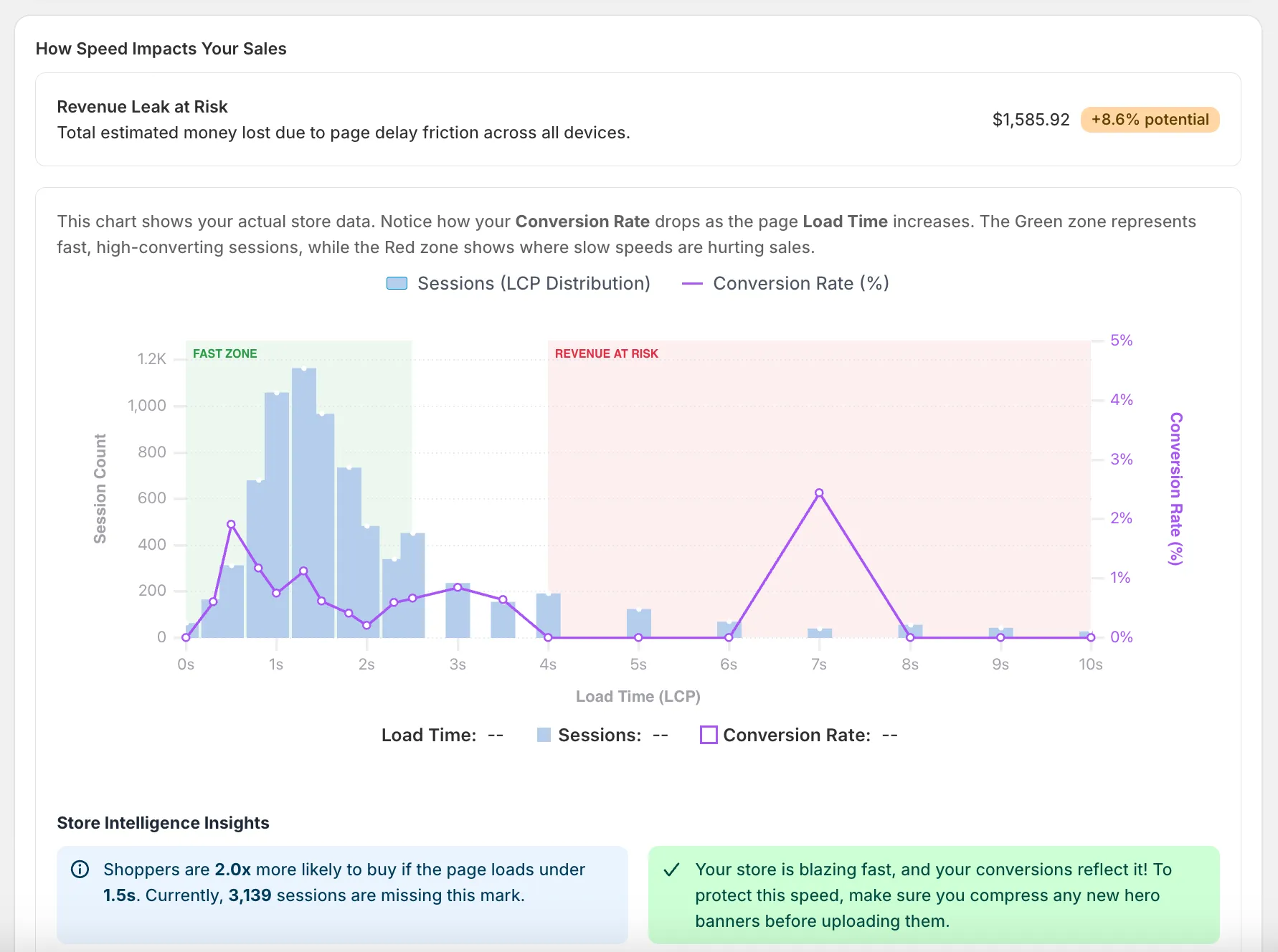
Superspeed’s most powerful feature for consultants is its ability to quantify the financial impact of technical debt. When you can present a report showing that poor Interaction to Next Paint (INP) is resulting in an estimated $8,000 monthly revenue leak, you immediately command the client’s attention and justify the cost of your consulting engagement.
Auditing the Tech Stack Objectively
Merchants often suffer from “app bloat,” installing dozens of scripts that degrade performance. Superspeed helps consultants objectively audit the tech stack by showing exactly how much delay specific third-party scripts are adding to the critical rendering path. This provides the hard data needed to convince a client to prune unnecessary apps or seek more performant alternatives.
Identifying “Ghost Checkouts”
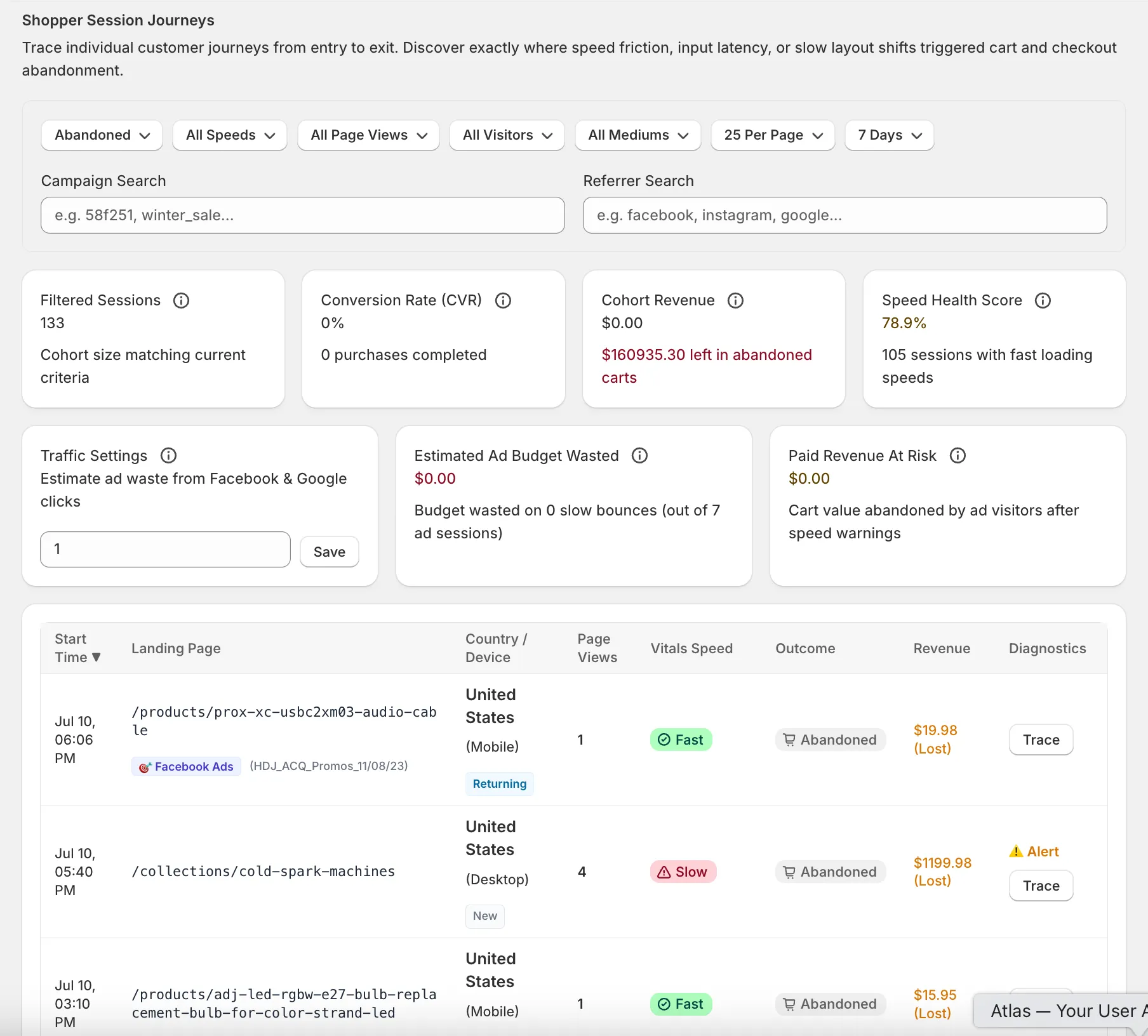
Uncovering a broken checkout flow is one of the highest-value services a consultant can provide. Superspeed’s session tracing identifies “ghost checkouts”—instances where a high-intent buyer attempted to purchase but was blocked by a technical failure or severe latency. Presenting this data to a merchant makes the value of your consulting immediately apparent.
The Data-Driven Consulting Workflow
Integrating Superspeed into your consulting practice changes how you deliver value to Shopify merchants.
- The Data-Backed Discovery: Begin every engagement by deploying Superspeed to gather a baseline of real user data. Instead of guessing where the problems lie, let the data dictate the strategy.
- Prioritization by ROI: Use Superspeed’s revenue impact analysis to prioritize your recommendations. Focus the client’s development resources on fixing the technical friction that is causing the largest financial drain.
- Objective Vendor Management: If the merchant works with a separate development agency, use Superspeed to hold them accountable. Ensure that new code deployments are not negatively impacting Core Web Vitals or introducing new revenue leaks.
- Proving Your Value: At the end of the engagement or during monthly reviews, use Superspeed’s reporting to show the reduction in technical friction and the corresponding uplift in recovered revenue, clearly demonstrating the ROI of your consulting fees.
Conclusion
The best Shopify consultants don’t just offer opinions; they offer solutions backed by irrefutable data. By adopting Superspeed, consultants gain the deep technical visibility required to identify hidden revenue leaks and optimize the entire shopping experience.
Superspeed transforms your consulting practice by allowing you to diagnose the root causes of poor conversion rates accurately and prove the financial impact of your recommendations. It is the essential analytics platform for consultants who want to deliver undeniable value and drive serious growth for their Shopify clients.