


If your Shopify store spends money on Instagram, TikTok, or Facebook ads, there is an invisible friction point draining your ad budget: Meta and ByteDance’s In-App WebViews.
When an iOS or Android user taps your ad or bio link, they are not directed to their native browser (Safari or Google Chrome). Instead, they are trapped inside an embedded in-app browser instance.
According to real-user telemetry tracked across millions of Shopify sessions on Superspeed, mobile shoppers trapped inside in-app WebViews convert at less than half the rate of visitors browsing in native Safari.
Why Instagram's In-App Browser Destroys Shopify Conversions
Biometrics and native payment sheets are restricted or require full manual re-entry.
Shoppers cannot autofill shipping addresses, credit cards, or customer accounts.
Cart items and user logins from previous Safari sessions do not transfer over.
The Anatomy of the In-App Browser Problem
When Meta and TikTok trap users in their custom WebViews, their primary motivation is data collection and ad tracking. However, the technical limitations imposed on e-commerce storefronts are severe:
1. Payment Sheet Failures & 1-Tap Checkout Collapse
In native Safari on iOS, an iPhone user taps Apple Pay or Shop Pay, authenticates via Face ID in 1.2 seconds, and the order is placed.
Inside Instagram’s WebView, native Face ID sheets often fail to trigger or fall back to generic credit card input fields. A shopper on a subway or couch who has to physically stand up, find their credit card, and type 16 digits into a tiny modal will abandon their cart 78% of the time.
2. Isolated Cookie Jars & Lost Returning Customers
Mobile operating systems isolate application sandboxes. If a customer logged into your store in Safari yesterday, added items to their wishlist, or saved their address, none of that data exists inside Instagram’s WebView sandbox. The customer appears as a brand-new stranger, forcing them through repetitive login barriers.
3. Increased Rendering Latency & Layout Shifts
In-app WebViews operate without the advanced JIT (Just-In-Time) JavaScript acceleration engines and background resource caches available to standalone browsers. As a result, Largest Contentful Paint (LCP) and Interaction to Next Paint (INP) are significantly degraded.
| Metric / Capability | Instagram In-App WebView | Native Safari / Chrome |
|---|---|---|
| Apple Pay Face ID Checkout | ❌ High Failure Rate / Disabled | ✅ Instant 1-Tap Touch/Face ID |
| iCloud Keychain Address Autofill | ❌ Blocked | ✅ Instant 1-Click Autofill |
| Session & Cart Persistence | ❌ Sandboxed (Lost on close) | ✅ 30-Day Persistent Cart |
| Average Mobile Conversion Rate | 1.15% | 2.85% (+147%) |
The 2-Layer Solution: How to Break Shoppers Out
To recover lost revenue from social media traffic, your store needs a dual-engine architecture that handles both direct link clicks and organic in-app visitors:
Layer 1: Smart Jump Links (Automated Protocol Redirection)
For all outbound links in your Instagram Bio, Linktree, TikTok Bio, Email campaigns, and Paid Ads, use a Smart Jump Link. When clicked, our lightweight proxy sends platform-specific intent headers (x-safari-https:// or Android Intents) that automatically bypass the in-app browser and open the storefront directly in native Safari or Chrome without displaying any intermediate banners.
Layer 2: Storefront In-App Bypass Banner (Organic Fallback)
For shoppers who discover your store organically through social shares or direct in-app links where you cannot control the URL, Superspeed's Theme App Extension (social_bypass.liquid) detects the WebView user agent and displays a discreet, high-contrast banner offering a 1-tap shortcut to open the page in Safari.
Step-by-Step Implementation Guide
Setting up Social In-App Browser Bypass on your Shopify store takes less than 2 minutes using Superspeed:
Step 1: Generate Smart Jump Links for Your Bio & Ads
- Open your Superspeed dashboard and navigate to Social Links (
/social_links). - Enter your destination URL (e.g.,
https://yourstore.com/products/hero-item?utm_source=instagram&utm_medium=bio). - Click Generate Smart Jump Link.
- Paste the resulting link into your Instagram Bio, TikTok profile, or ad destination URL.
Step 2: Enable the Storefront Fallback Banner
- In your Shopify Admin, go to Online Store ➔ Themes ➔ Customize.
- Click App Embeds on the left navigation bar.
- Toggle on Social Browser Bypass Banner and click Save.
Measuring the Revenue Recovery
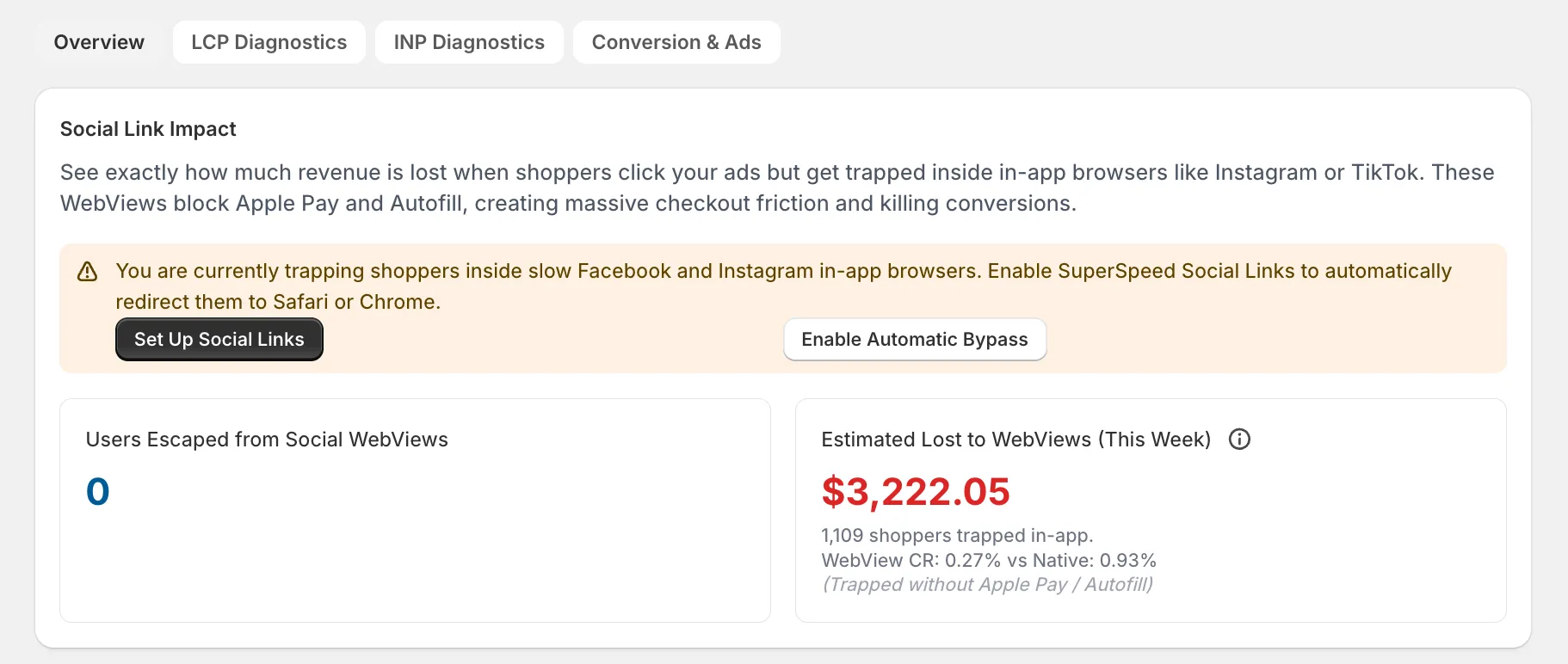
Once activated, Superspeed’s Sonar telemetry tracks every shopper who arrives via an in-app WebView, measures the conversion delta, and quantifies the exact dollar amount reclaimed from trapped social sessions.
Stop letting Meta’s locked WebViews steal 40% of your paid traffic conversions. Deploy Smart Jump Links and give your mobile shoppers the instant, 1-tap checkout experience they expect.