


Google Search Console (GSC) has officially rolled out one of its most consequential updates in recent memory: native support for Social Media Profile Property Types.
When opening the property setup dialog in Google Search Console, site owners, growth marketers, and e-commerce founders will now find a brand-new section dedicated to verifying and tracking four major social platforms:
- Instagram (instagram.com/yourbrand)
- TikTok (tiktok.com/@yourbrand)
- X / Twitter (x.com/yourbrand)
- YouTube (youtube.com/@yourbrand)
Google is officially acknowledging that social media profiles are no longer secondary channels — they are first-class indexable search properties. If your brand produces reels, short-form video, tweets, or long-form video tutorials, Google is now crawling, indexing, and surfacing your social assets directly inside main Search Engine Results Pages (SERPs).
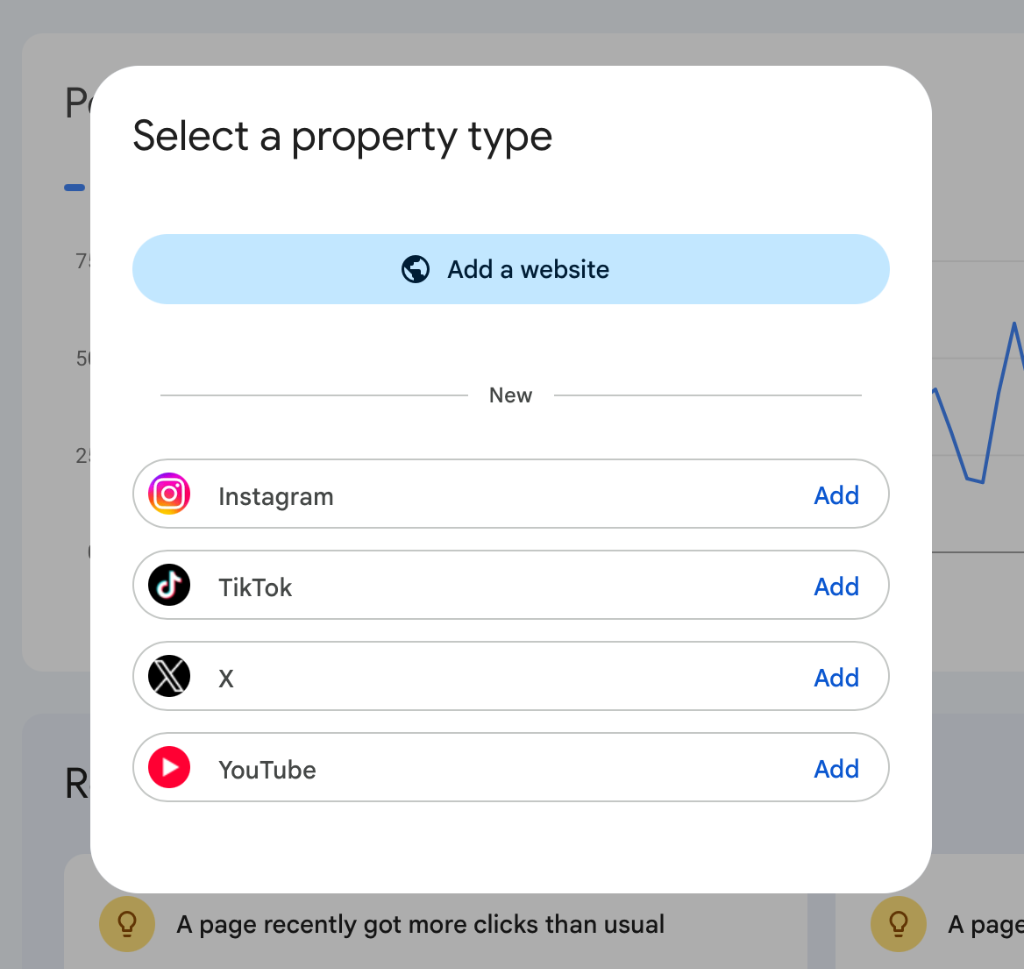
Figure 1: Google Search Console property selection dialog introducing Social Profiles (Instagram, TikTok, X, YouTube).
For e-commerce brands, this feature opens up powerful new visibility into multi-channel search performance. However, it also introduces a massive hidden revenue leak that 95% of store owners will completely miss.
When customers discover your social profiles through Google Search and click your link-in-bio to buy, they are funneled directly into sluggish social in-app browsers (WebViews). These in-app browsers break native payment methods like Apple Pay, drop cart sessions, and destroy conversion rates.
In this mega-guide, we take a deep technical look into how Google’s new Social Media Properties work, how to set them up in Search Console, why social in-app WebViews bleed store revenue, and how to implement active browser escapes to capture every dollar of social search traffic.
Why Google Added Social Media Properties to Search Console
For over a decade, Google Search Console treated website domains as the single source of truth for search performance. Social media accounts were treated as external third-party URLs. If a brand’s viral TikTok video ranked on Page 1 of Google for a commercial query like “best ergonomic office chair review”, the brand had zero reporting inside GSC to see how many impressions or clicks that video generated.
Google’s introduction of Social Media Properties marks a fundamental shift in search behavior: the convergence of Social Search and Web Search.
Modern consumers do not search the web the way they did five years ago. According to recent search behavior studies:
- Over 40% of Gen-Z and Millennial shoppers use TikTok and Instagram as their primary search engines when discovering new products.
- Google’s ranking algorithm increasingly embeds TikTok videos, Instagram Reels, YouTube Shorts, and X discussion threads directly inside main search results to satisfy user demand for authentic, human-generated content.
- Brand searches (e.g., “Gymshark activewear review”) often display the brand’s official Instagram handle and YouTube channel above secondary blog reviews.
By adding dedicated social property types, Google gives brand owners direct API access to report on social search visibility across four core metrics:
- Total Social Search Impressions: How frequently your brand’s social posts, reels, videos, and profiles appear in Google Web Search, Video Search, and Google Discover.
- Organic Social Click-Through Rates (CTR): The exact percentage of Google searchers who click your social profile links instead of clicking your main store domain.
- Query-Level Keyword Attribution: The precise search terms (e.g., “how to style linen shirts”, “is brand X legit”) that trigger your social content in Google Search.
- Platform-Specific Form Factor Insights: Granular performance breakdowns comparing desktop vs. mobile social search performance.
The 4 New Social Media Property Types Deep-Dive
Each social platform operates under different indexing mechanisms within Google’s search infrastructure. Understanding how Google crawls each channel allows you to tailor your content strategy accordingly.
| Social Property Type | Google SERP Placements | Primary E-Commerce Use Case | Key Conversion Path |
|---|---|---|---|
| Instagram Property | Google Main Web Search, Image Search, Google Discover Feed | Visual product showcases, lifestyle photography, brand authority | Link-in-bio & tagged product posts |
| TikTok Property | Short-Video Carousels, Mobile SERP Featured Snippets | Unboxing videos, product demonstrations, viral UGC trends | Profile link & pinned video comments |
| X (Twitter) Property | Real-Time Search Cards, News Carousels, Knowledge Panels | Brand announcements, customer service updates, founder updates | Pinned tweets & direct URL links |
| YouTube Property | Google Video Tab, Main SERP Video Carousels, Shorts Grid | Long-form product tutorials, deep-dive reviews, comparison guides | Video description links & pinned cards |
1. Instagram Property
Google crawls public Instagram profiles, post captions, and reel metadata. Instagram properties in GSC report on how your visual content appears in both standard web search listings and Google Image Search.
- Key Search Surface: Google Discover feeds on mobile devices frequently recommend Instagram Reels matching a user’s recent browsing history.
- SEO Intent: High-intent visual search (e.g., “minimalist streetwear outfit ideas”).
2. TikTok Property
TikTok videos are indexed by Google using closed-caption text transcripts, video title tags, and sound audio tags. In mobile SERPs, Google renders dedicated Short Videos carousels where TikTok clips play preview snippets.
- Key Search Surface: Mobile Google Search video carousels.
- SEO Intent: Problem-solution product searches (e.g., “how to remove stain from silk shirt”).
3. X (Twitter) Property
Google maintains a real-time indexing pipeline for X. When news breaks or when a brand goes viral, X search cards update within seconds on Google SERPs.
- Key Search Surface: Google Live News boxes and brand Knowledge Graph panels.
- SEO Intent: Brand reputation, customer service queries, and store launch announcements.
4. YouTube Property
YouTube is owned by Alphabet (Google’s parent company), making its integration into GSC the deepest of all four channels. YouTube properties report on both long-form horizontal videos and YouTube Shorts.
- Key Search Surface: Google Video tab, rich video snippets in main web search, and YouTube organic search.
- SEO Intent: In-depth buyer research, tutorial guides, and direct comparison queries (e.g., “Dawn theme vs Impulse theme comparison”).
Step-by-Step Technical Guide: Verification & Configuration in GSC
Setting up Social Media Properties in Google Search Console does not require modifying DNS TXT records or uploading HTML verification files to your web server. Instead, Google relies on OAuth 2.0 Identity Verification.
Follow these exact steps to connect your social accounts to GSC:
Step 1: Access the Property Selector
Log into your Google Search Console dashboard. Click the property dropdown menu in the upper-left corner of the interface and select + Add Property.
Step 2: Choose Social Profile Property Type
In the modal window titled Select a Property Type, scroll past the standard Domain and URL Prefix options to the new Social Profiles section.
Select the platform you wish to add (Instagram, TikTok, X, or YouTube) and click Continue.
Step 3: Authorize OAuth Identity Verification
Google will prompt you to authenticate ownership of the target social account:
- For Instagram: You will be redirected to Meta Business Manager. You must log in with an account that holds Admin or Editor access to the connected Facebook Page / Instagram Professional Account.
- For YouTube: Select the Google Workspace or Gmail account that owns or manages the target YouTube Channel.
- For TikTok: Log into TikTok for Business and grant read-only analytics access to Google Search Console.
- For X (Twitter): Authenticate via X Developer OAuth and approve read-only profile permissions.
Step 4: Verify Connection & Population Time
Once OAuth authorization completes, Google Search Console will display a confirmation banner reading “Property Ownership Auto-Verified.”
- Data Lag: Initial historical performance data takes 24 to 48 hours to populate in your GSC reporting dashboard.
- Property Permissions: You can invite agency partners or team members to view social property data under GSC Settings > Users & Permissions.
The Hidden Revenue Threat: The Social In-App Browser Trap
While tracking social search performance inside Google Search Console gives brands valuable search data, it highlights a major leakage point in modern e-commerce conversion funnels.
Consider the standard customer journey created by Google’s new social indexation:
- A customer searches Google on their iPhone for “best organic skincare for sensitive skin”.
- Google SERP displays your brand’s official Instagram Reel or TikTok video at the top of the search results.
- The customer clicks the Google search result, opening your Instagram or TikTok profile.
- Intrigued by your content, the customer clicks your link-in-bio or pinned product link to visit your store.
This is where the conversion funnel completely collapses.
When a user clicks a link inside Instagram, TikTok, or X, the social app does not open their native mobile browser (Safari on iOS or Chrome on Android). Instead, the app forces the user into an embedded In-App WebView browser.
The 4 Conversion-Killing Bottlenecks of In-App WebViews
- • 1. Native Payment Gateways are Blocked: In-app WebViews disable native 1-click Apple Pay and Google Pay popups. Shoppers are forced to manually type 16-digit credit card numbers on touch keyboards, causing up to 58% of mobile buyers to abandon the cart immediately.
- • 2. Cookie Isolation & Lost Sessions: Social WebViews run in sandboxed memory environments that do not share cookies or local storage with Safari or Chrome. Returning customers are logged out of their accounts, and saved cart items disappear.
- • 3. Massive CPU Overhead & Script Throttling: Meta and TikTok inject heavy JavaScript tracking scripts directly into every WebView page load. This thread locking delays Largest Contentful Paint (LCP) by an average of 3.2 seconds.
- • 4. Navigation Deadlocks: Tapping the top-left "Done" or "X" button inside an in-app browser immediately destroys the entire browsing session, leaving zero retargeting footprint and preventing back-button recovery.
Empirical Real User Monitoring (RUM) Data
At Superspeed, our telemetry engines monitor performance across 1.5 billion+ real user sessions on live Shopify and e-commerce stores. The real-world field data paints a stark picture:
- Standard Mobile Safari / Chrome Browser: Average Conversion Rate = 2.85% | Average LCP = 1.4s
- Instagram / TikTok In-App WebView Browser: Average Conversion Rate = 1.02% | Average LCP = 4.6s
Shoppers trapped in social WebViews convert at a 64% lower rate than shoppers who browse in native system browsers.
If your brand succeeds in ranking social profiles on Google Search Console, but sends those searchers into trapped in-app WebViews, you are losing nearly two-thirds of your potential social search revenue.
How to Calculate Your Brand’s Social WebView Revenue Leak
To quantify the exact dollar amount your store is losing to social browser traps, use this straightforward mathematical model based on your Google Search Console and analytics data:
Social WebView Revenue Leak Formula
Where:
• Social Sessions = Monthly visitors arriving from Instagram, TikTok, or X referrals.
• Standard Mobile CVR = Your store's baseline conversion rate on Safari/Chrome (e.g., 2.5%).
• WebView CVR = Conversion rate for in-app social traffic (e.g., 0.9%).
• AOV = Average Order Value (e.g., $85).
Worked Example:
Consider a store generating 20,000 monthly visits from social profiles discovered via Google Search and social media feeds, with an Average Order Value of $85:
- Baseline Potential (Native Safari/Chrome at 2.5% CVR):
20,000 visits × 2.5% × $85 = $42,500 / month - Actual Realized Revenue (Trapped WebView at 0.9% CVR):
20,000 visits × 0.9% × $85 = $15,300 / month - Net Revenue Bleed:
$42,500 - $15,300 = $27,200 / month lost to social browser friction
Over the course of a single year, that invisible friction costs the brand $326,400 in lost purchases.
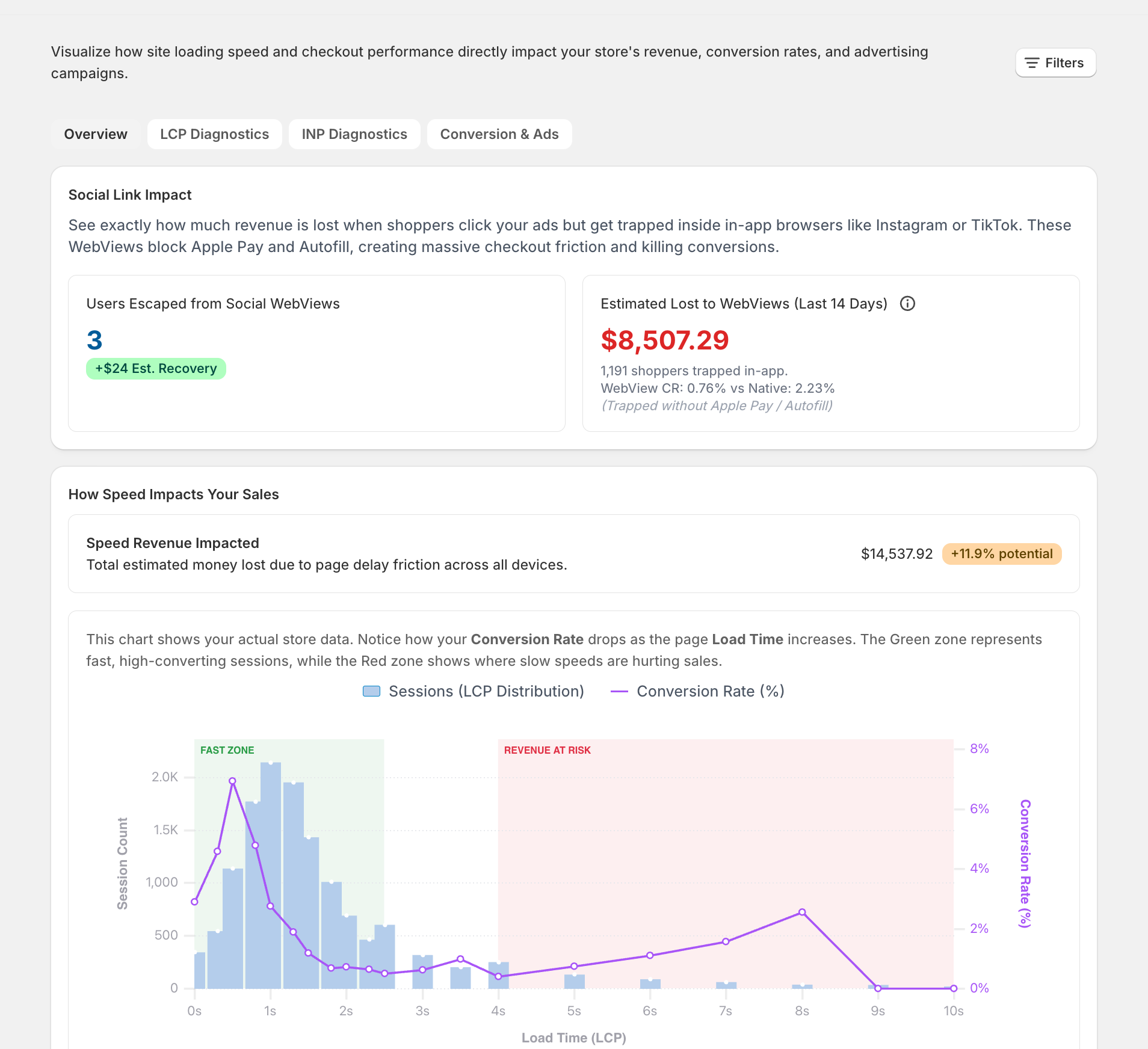
Figure 2: Superspeed Revenue Intelligence dashboard tracking real-time Social Link Impact and estimated lost revenue to trapped in-app WebViews ($8,507.29 lost in 14 days).
The Technical Solution: Implementing Social Media Browser Safe-Bypass
At Superspeed, we do not view site speed as an isolated metric — we position our platform around Revenue Intelligence & Active Conversion Optimization.
To eliminate the social browser trap, Superspeed includes built-in Social Media Browser Safe-Bypass Engine.
How Social Browser Safe-Bypass Works Under the Hood
When a user visits your store, Superspeed’s Social Media Browser Safe-Bypass engine immediately inspects the incoming request’s execution scope:
- User-Agent Detection: Identifies embedded WebView signatures such as Instagram, TikTok, Facebook, or X.
- Android 0-Click Chrome Intent Breakout: On Android devices, standard HTTP redirects cannot escape WebViews. Superspeed generates a native Android Intent URL schema. This forces the Android operating system to immediately launch the visitor’s default Google Chrome browser, bypassing the social app completely with zero user clicks required.
- iOS Smart Navigation Header: On iOS devices (where Apple restricts programmatic Safari launching from third-party WebViews), Superspeed renders an ultra-lightweight, non-intrusive header bar that guides shoppers to tap “Open in Safari” to enable 1-click Apple Pay.
Why DIY WebView Bypass Scripts Fail (And Why You Shouldn’t Write Your Own)
When store owners first realize they are losing sales to social WebViews, the instinct is often to copy-paste basic JavaScript snippets or User-Agent regexes found in developer forums.
This is a dangerous trap for three reasons:
- Constantly Shifting User-Agents: Meta (Instagram/Facebook) and TikTok update their mobile User-Agent signatures and internal WebView headers every few weeks. A hardcoded regular expression written today will break next month, either failing to catch WebViews or accidentally triggering false positives on legitimate mobile Safari/Chrome users.
- Fragile Protocol Schemas: Android Intent URL schemas and iOS deep links require exact OS-level parameter formatting. Slight misconfigurations can cause Chrome to throw an error or crash the user’s mobile browser entirely.
- Apple iOS Sandbox Constraints: Apple strictly restricts programmatic browser launching from third-party iOS WebViews for security reasons. Overcoming this requires sophisticated, non-intrusive UI guidance that respects Apple’s Human Interface Guidelines while maintaining a high click-through rate to Safari.
The Superspeed Managed Solution: Zero-Maintenance Social Escape
Rather than requiring merchants to write, debug, and maintain complex theme scripts, Superspeed provides a fully managed, cloud-updated Social Media Browser Safe-Bypass Engine.
Incoming Social Search or Ad Visitor
Shopper taps store link inside Instagram, TikTok, X, or Facebook app
Superspeed Managed Engine
Automated WebView Protocol & OS Detection with Cloud-Updated Signatures
Android Auto-Intent Breakout
0-click automatic switch to native Google Chrome browser.
iOS Native Safari Guidance
Lightweight header bar guiding 1-click launch to Safari & Apple Pay.
Superspeed continuously updates its WebView detection algorithms in the background. As Meta, TikTok, and X modify their in-app browser architectures, Superspeed’s theme app extension automatically adapts, ensuring your store seamlessly routes shoppers to native mobile browsers with zero maintenance or code configuration required.
Integrating GSC Social Data with Superspeed’s Revenue Intelligence Engine
Tracking social search visibility in Google Search Console is only half the battle. To scale your store predictably, you need to connect GSC search query impressions directly with real user purchase telemetry.
At Superspeed, we built native Google Search Console and GA4 backend integration directly into our platform.
Google Search Console API Ingestion
Pulls daily impression, click, position, and query dataset
Superspeed Backend Analytics Sync
Processes Parquet telemetry files via MarketingDataSyncJob.rb
Svelte 5 GSC & Keyword Intelligence Dashboard
- • Striking Distance Keyword Alerts (Page 2 rankings ready to rank Page 1)
- • Revenue Per Search Impression (RPSI) revenue calculation
- • 1-Click AI Pillar Blog Post Generator
How Superspeed Bridges the Gap Between Search Data & Sales
- OAuth 2.0 Backend Pipeline: Superspeed connects securely to your Google Search Console account via our
GoogleCredentialmodel and automatedMarketingDataSyncJobbackground worker. - Striking Distance Keyword Alerts: Our backend automatically flags low-hanging fruit keywords (queries ranking on Page 2 between positions #11 and #20) where a small optimization boost can double organic traffic.
- Revenue Per Search Impression (RPSI): Instead of showing vanity search metrics, Superspeed correlates GSC keyword data with Shopify Web Pixel checkout telemetry to calculate the exact dollar value generated by each search query.
- 1-Click AI Pillar Blog Generator: Found a trending social search keyword in Search Console? Use Superspeed’s
SeoInsights.sveltedashboard to instantly draft a fully formatted, SEO-optimized blog post directly to your store with one click.
Action Plan & Checklist for E-Commerce Brands in 2026
To capitalize on Google Search Console’s new Social Media Profile Properties while protecting your store’s conversion rate, follow this 5-step execution checklist:
Your 5-Step Social SEO Action Plan
- Verify Social Properties in GSC: Log into Google Search Console today and add your Instagram, TikTok, X, and YouTube profiles via the new Social Profiles menu.
- Audit Social Referral Conversion Rates: Inspect your analytics telemetry to compare conversion rates between standard mobile Safari/Chrome traffic and social media referrals.
- Deploy Social Browser Safe-Bypass: Ensure your storefront runs an active breakout engine like Superspeed's Social Media Browser Safe-Bypass to redirect Android users into native Chrome and guide iOS users into Safari.
- Optimize Social Bio Links: Add UTM parameters (e.g., ?utm_source=instagram&utm_medium=social_bio) to all profile bio links for precise query attribution.
- Connect Superspeed Revenue Intelligence: Install Superspeed on your store to track real user Core Web Vitals, eliminate ghost checkouts, and connect GSC search queries directly to checkout dollars.
Turn Google Search Console impressions into actual sales. Install Superspeed free for 14 days to unlock Social WebView Escape, real-user performance telemetry, and AI-powered SEO keyword tools.